



1
de
9
Cargando...
APOGEE | SKU:
615112
Agotado
APOGEE HypeMiC (1-year extended warranty included)
Precio normal
$342.26
Precio unitario
/
Agotado
Los gastos de envío se calcularán al momento de pagar.
Product Condition
| Brand New | Unused, as sold. |
|---|---|
| Mint | Like new, no flaws. |
| Excellent | Barely used, very minor wear. |
| Very Good | Light wear, fully functional. |
| Good | Visible wear, plays fine. |
| Fair | Heavy wear, still playable. |
No se ha podido cargar la disponibilidad de recogida
Descripción
Descripción
★Bring the magic of the studio to your recordings
Have you ever wondered why your favorite song sounds so good when it comes through your speakers? Vocals magically emerge naturally from the background music. Compression plays a key role here. HypeMiC is a USB microphone that lets you easily add studio-quality analog compression. Whether you're recording vocals, narration, podcasts, percussion, or various instruments, with HypeMiC, your iPhone, or computer, your studio can become wherever inspiration strikes. Bring vibrant, high-quality sound to your recordings.
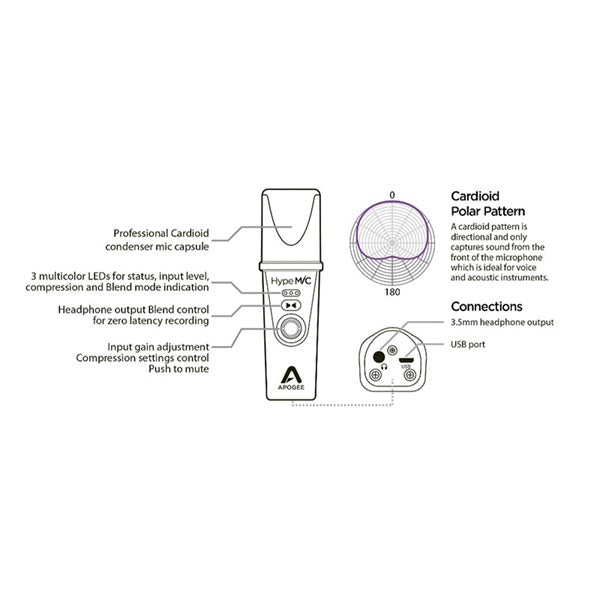
HypeMiC Features: Built-in studio-quality analog compressor; Crystal-clear sound quality up to 24-bit/96kHz with PureDIGITAL connection; High-quality cardioid condenser microphone capsule; Headphone output with Blend function for zero-latency monitoring; Tripod, pop filter, and dedicated case included; No complicated setup required. Plug and record with compatible audio apps; Compatible with iOS, Mac, and PC
●HypeMiC makes recording easier and higher quality. ・Music - Vocals
HypeMiC's unique analog compression enhances your vocal sound with a texture that no other microphone can match. With three compression settings, you can achieve a balanced, mixed-quality recording without the need for professional processing or mixing.
Recording has never been easier, so you'll never miss your best take again.
・Acoustic instruments
HypeMiC's smoothness and warmth will take your acoustic instrument recording to a new level, as the compression level is always just right, capturing the rich tone of your instrument without compromising it.
Designed to withstand high sound pressure levels, HypeMiC lets you record loud acoustic instruments like brass, choirs and drums with clarity and detail.
・Narration/Audio for video podcasts, narration, interviews, YouTube recording, live streaming, meetings
Whether you're recording livestreams, podcasts, or broadcasts, HypeMiC balances audio dynamics with exceptional clarity, ensuring you can record in quality that's ready for broadcast. HypeMiC is compatible with most Mac, PC, and iOS apps that allow you to select an audio device. So you can always record professional studio-quality sound, wherever you are.
If you're looking for a fresh, vibrant sound to add to your recordings and mixes, HypeMiC is the perfect choice. Use the signal from HypeMiC's stereo output to feed your mixer, audio interface or hardware recorder, and you'll get the unique, powerful sound of HypeMiC compression.
●Compression settings
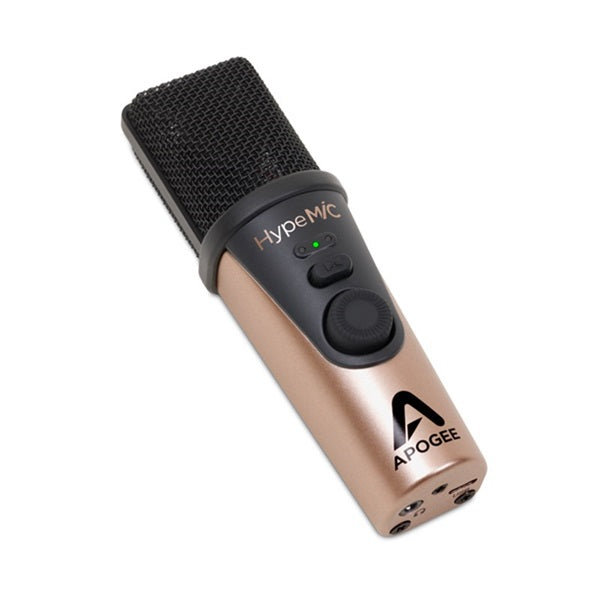
HypeMiC offers three selectable compression settings, all controllable via the front panel knob.
・Adjust (less complicated)
A minimal compression setting, perfect for shaping vocals and instruments to fit your recording.
・Complete (Complete)
This setting is ideal for podcasts, interviews, live streams, and other situations where you want to ensure precise vocal dynamics.
・Hit (high compression)
This is suitable for recording voices with maximum compression, such as those used in live broadcasts.
For actual recording, try either setting to find your preference. However, please note that the microphone input level also affects compression. Compression also tends to emphasize environmental noise.
Latency-free monitoring: The Blend function allows you to monitor with zero latency even while recording.
Like Jam+ and MiC+, HypeMiC's 3.5mm stereo headphone output offers zero-latency monitoring with the Blend function, which allows you to adjust the mix between the direct signal (input from your microphone) and software playback (output from your computer) to find the perfect balance.
Louder and clearer. Whether you're recording, monitoring playback in your favorite production applications, or listening to streaming, HypeMiC will dramatically improve the quality of any audio playback. With a high-resolution sample rate of 96kHz, HypeMiC provides ample headroom to drive headphones or powered speakers with stunning clarity and powerful volume.
● Microphone, compressor, preamp, and converter - four products in one compact housing
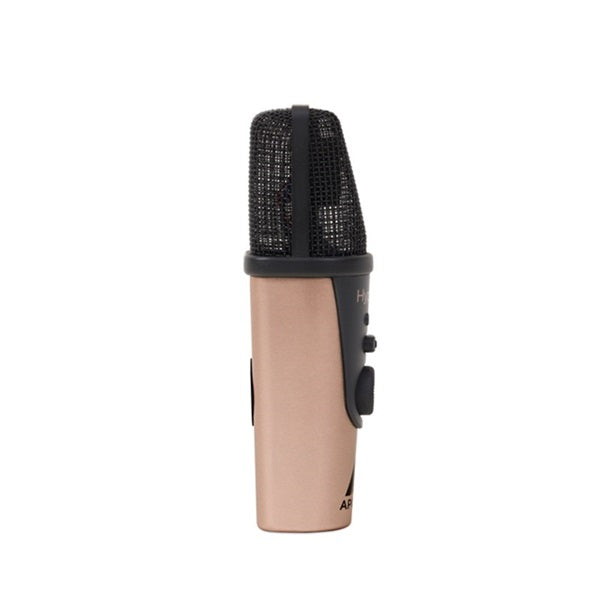
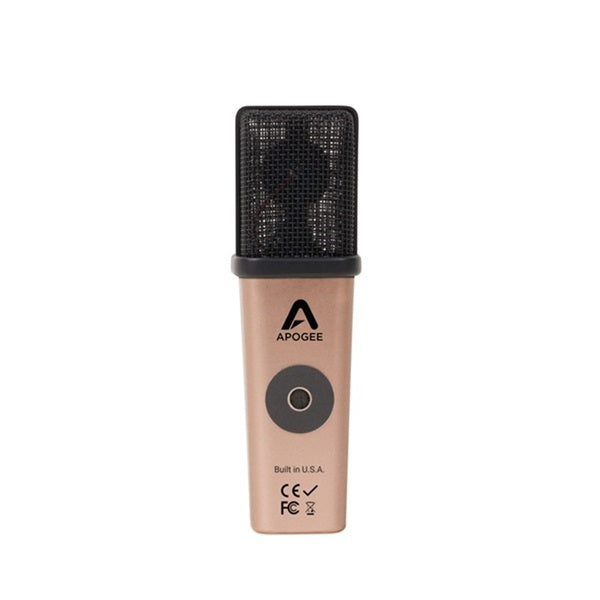
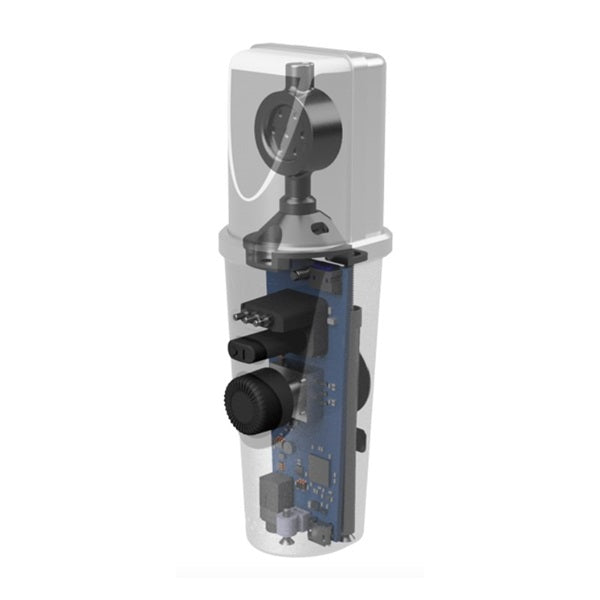
What is HypeMiC? It's a device that combines a microphone, analog compressor, mic preamp, and A/D and D/A converters in a single compact enclosure. Apogee has taken great care in the design and development of HypeMiC, striving for the lowest possible noise and the highest possible audio quality.
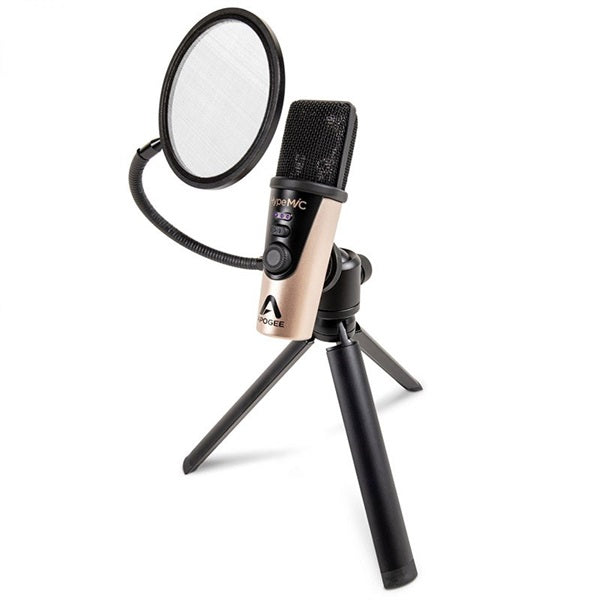
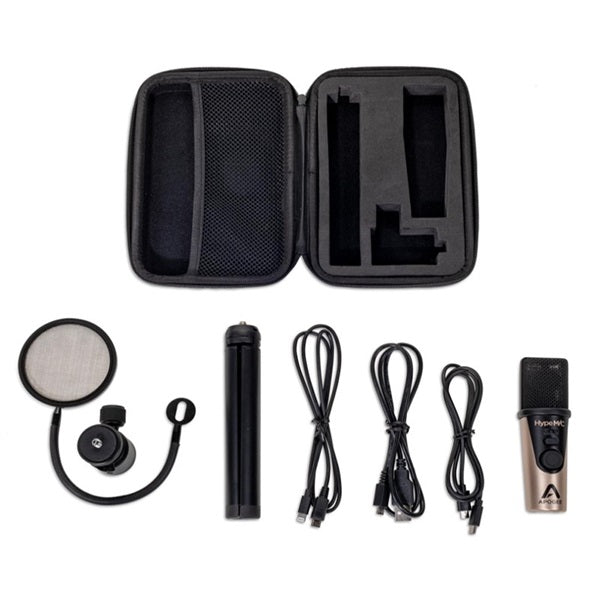
■Included accessories: A dedicated case, custom pop filter, and desktop tripod are included. HypeMiC comes with all the accessories you need for recording.
■ Operating environment and specifications ◎ Mac OS 10.9 or later
Mac with Intel processor
Memory: 2 GB or more Connection and power supply: Powered by the computer's USB port
◎Windows 10 or later
Windows PC with Intel/AMD x86-64 processor
Memory: 4GB or more Connection and power supply: Powered by the computer's USB port
ASIO4ALL driver (professional applications only)
◎iOS 9 or later・Connection: Lightning, Power: Powered by iOS device・Compatible models:
iPhone XS Max, iPhone XS, iPhone XR,
iPhone X,
iPhone 8 Plus, iPhone 8,
iPhone 7 Plus, iPhone 7,
iPhone SE, iPhone 6s Plus, iPhone 6s, iPhone 6 Plus, iPhone 6,
iPhone 5s, iPhone 5c, iPhone 5,
iPad Pro (10.5 inch), iPad Pro (12.9 inch) (2nd generation), iPad Pro (9.7 inch), iPad Pro (12.9 inch),
iPad Air 2, iPad Air,
iPad mini 4, iPad mini 3, iPad mini 2, iPad mini,
iPad (6th generation), iPad (5th generation), iPad (4th generation)
iPod touch (6th generation), iPod touch (5th generation)
◎ Included items
Apogee HypeMiC
Desktop tripod Microphone stand adapter Pop filter dedicated case
Micro-USB to USB-C cable
Micro-USB to USB-A cable
Micro B-to-Lightning cable
Quick Start Guide
◎Specifications/Dimensions Input method: Micro USB
Connection method: Lightning, USB (Type-C), USB (Type-A)
Weight: 0.45 lbs (0.20 kg)
Length: 4.88 (124 mm)
Width: 1.5 (38 mm)
Height: 1.5 (38 mm)
AD Conversion/Mic Pre Max SPL: 130dB (1% THD @ 1kHz)
Sensitivity: -36 dBfs (94 dB SPL. 1 kHz)
Noise Level: -108dBfs (A) @ 0 dB Gain Max Gain (Preamp): 46 dB
*Please check the latest operating environment on the manufacturer's website before purchasing.
#Audio Interface
#Audio Interface
Have you ever wondered why your favorite song sounds so good when it comes through your speakers? Vocals magically emerge naturally from the background music. Compression plays a key role here. HypeMiC is a USB microphone that lets you easily add studio-quality analog compression. Whether you're recording vocals, narration, podcasts, percussion, or various instruments, with HypeMiC, your iPhone, or computer, your studio can become wherever inspiration strikes. Bring vibrant, high-quality sound to your recordings.
HypeMiC Features: Built-in studio-quality analog compressor; Crystal-clear sound quality up to 24-bit/96kHz with PureDIGITAL connection; High-quality cardioid condenser microphone capsule; Headphone output with Blend function for zero-latency monitoring; Tripod, pop filter, and dedicated case included; No complicated setup required. Plug and record with compatible audio apps; Compatible with iOS, Mac, and PC
●HypeMiC makes recording easier and higher quality. ・Music - Vocals
HypeMiC's unique analog compression enhances your vocal sound with a texture that no other microphone can match. With three compression settings, you can achieve a balanced, mixed-quality recording without the need for professional processing or mixing.
Recording has never been easier, so you'll never miss your best take again.
・Acoustic instruments
HypeMiC's smoothness and warmth will take your acoustic instrument recording to a new level, as the compression level is always just right, capturing the rich tone of your instrument without compromising it.
Designed to withstand high sound pressure levels, HypeMiC lets you record loud acoustic instruments like brass, choirs and drums with clarity and detail.
・Narration/Audio for video podcasts, narration, interviews, YouTube recording, live streaming, meetings
Whether you're recording livestreams, podcasts, or broadcasts, HypeMiC balances audio dynamics with exceptional clarity, ensuring you can record in quality that's ready for broadcast. HypeMiC is compatible with most Mac, PC, and iOS apps that allow you to select an audio device. So you can always record professional studio-quality sound, wherever you are.
If you're looking for a fresh, vibrant sound to add to your recordings and mixes, HypeMiC is the perfect choice. Use the signal from HypeMiC's stereo output to feed your mixer, audio interface or hardware recorder, and you'll get the unique, powerful sound of HypeMiC compression.
●Compression settings
HypeMiC offers three selectable compression settings, all controllable via the front panel knob.
・Adjust (less complicated)
A minimal compression setting, perfect for shaping vocals and instruments to fit your recording.
・Complete (Complete)
This setting is ideal for podcasts, interviews, live streams, and other situations where you want to ensure precise vocal dynamics.
・Hit (high compression)
This is suitable for recording voices with maximum compression, such as those used in live broadcasts.
For actual recording, try either setting to find your preference. However, please note that the microphone input level also affects compression. Compression also tends to emphasize environmental noise.
Latency-free monitoring: The Blend function allows you to monitor with zero latency even while recording.
Like Jam+ and MiC+, HypeMiC's 3.5mm stereo headphone output offers zero-latency monitoring with the Blend function, which allows you to adjust the mix between the direct signal (input from your microphone) and software playback (output from your computer) to find the perfect balance.
Louder and clearer. Whether you're recording, monitoring playback in your favorite production applications, or listening to streaming, HypeMiC will dramatically improve the quality of any audio playback. With a high-resolution sample rate of 96kHz, HypeMiC provides ample headroom to drive headphones or powered speakers with stunning clarity and powerful volume.
● Microphone, compressor, preamp, and converter - four products in one compact housing
What is HypeMiC? It's a device that combines a microphone, analog compressor, mic preamp, and A/D and D/A converters in a single compact enclosure. Apogee has taken great care in the design and development of HypeMiC, striving for the lowest possible noise and the highest possible audio quality.
■Included accessories: A dedicated case, custom pop filter, and desktop tripod are included. HypeMiC comes with all the accessories you need for recording.
■ Operating environment and specifications ◎ Mac OS 10.9 or later
Mac with Intel processor
Memory: 2 GB or more Connection and power supply: Powered by the computer's USB port
◎Windows 10 or later
Windows PC with Intel/AMD x86-64 processor
Memory: 4GB or more Connection and power supply: Powered by the computer's USB port
ASIO4ALL driver (professional applications only)
◎iOS 9 or later・Connection: Lightning, Power: Powered by iOS device・Compatible models:
iPhone XS Max, iPhone XS, iPhone XR,
iPhone X,
iPhone 8 Plus, iPhone 8,
iPhone 7 Plus, iPhone 7,
iPhone SE, iPhone 6s Plus, iPhone 6s, iPhone 6 Plus, iPhone 6,
iPhone 5s, iPhone 5c, iPhone 5,
iPad Pro (10.5 inch), iPad Pro (12.9 inch) (2nd generation), iPad Pro (9.7 inch), iPad Pro (12.9 inch),
iPad Air 2, iPad Air,
iPad mini 4, iPad mini 3, iPad mini 2, iPad mini,
iPad (6th generation), iPad (5th generation), iPad (4th generation)
iPod touch (6th generation), iPod touch (5th generation)
◎ Included items
Apogee HypeMiC
Desktop tripod Microphone stand adapter Pop filter dedicated case
Micro-USB to USB-C cable
Micro-USB to USB-A cable
Micro B-to-Lightning cable
Quick Start Guide
◎Specifications/Dimensions Input method: Micro USB
Connection method: Lightning, USB (Type-C), USB (Type-A)
Weight: 0.45 lbs (0.20 kg)
Length: 4.88 (124 mm)
Width: 1.5 (38 mm)
Height: 1.5 (38 mm)
AD Conversion/Mic Pre Max SPL: 130dB (1% THD @ 1kHz)
Sensitivity: -36 dBfs (94 dB SPL. 1 kHz)
Noise Level: -108dBfs (A) @ 0 dB Gain Max Gain (Preamp): 46 dB
*Please check the latest operating environment on the manufacturer's website before purchasing.
#Audio Interface
#Audio Interface
Payment & Security
Payment methods
Your payment information is processed securely. We do not store credit card details nor have access to your credit card information.
For orders exceeding Paypal’s transaction limit of 1 million yen, we will provide more details. For secure transactions, items will only be shipped to the address registered in your Paypal account.
Regarding detailed information and contact information to us, please check FAQ.
Please Note
The following information applies to international orders.
■ Condition
Items with “USED” in the product name are pre-owned and will be delivered as shown in the photos. Signs of wear may be present. All items are function-tested by our staff and rechecked before dispatch.
■ Stock
Many products are stocked across Ikebe stores in Japan. As a result, shipment may take several days. In-store sales may also cause items to sell out. If an item is unavailable, we will contact you promptly; in that case, the order will be canceled and any payment will be refunded.
■ Shipping
We ship via FedEx. Shipments are fully insured against damage or loss during transit.
- Asia: 10–20 days (estimated)
- North America & Oceania: 20–30 days (estimated)
Shipping costs are calculated based on the delivery address and confirmed at the time of dispatch.
■ Taxes & Duties
Import duties, taxes, and fees are the buyer’s responsibility and are not included in the item price or shipping cost. These fees are typically collected by the carrier upon delivery or at pickup. Please check with your country’s customs office for details before purchasing.
■ Other
We cannot declare a reduced item value or mark purchases as gifts.
* Warranty
Our product warranty is valid only within Japan.
* Voltage
All electrical products are intended for the Japanese market and are designed for 100 V operation.
*Regarding transportation
Based on the regulations of the shipping company, aviation laws, and the laws and import regulations of the destination country, we cannot ship dangerous goods or restricted items internationally.
Examples of such items include, but are not limited to, high-pressure gases (aerosol cans), flammable liquids (oils, paints, etc.), combustible materials, batteries, and other items classified as dangerous goods.
If your ordered items fall under these restrictions, we reserve the right to cancel your order or ship only certain items, at our discretion.
Furthermore, accessories and included items are also subject to these restrictions, so any items deemed ineligible for shipment will be removed before shipping. Please understand this in advance.
The final decision on whether or not to ship will be made by us based on the shipping company and relevant laws and regulations, and we cannot guarantee individual decisions in advance.
About us
Founded in 1975, Ikebe Music is one of Japan's largest general music stores.Thanks to its long history and proven track record, it has earned the trust of musicians and music fans not only in Japan but around the world.
Ikebe Music ships not only within Japan, but also overseas.As a well-known retailer of used musical instruments in Japan, we have a wide selection of used and vintage instruments.
We have a wide variety of unusual and rare instruments, so please take a look.Please note that we do not list new products, as our contracts with our suppliers prohibit international shipping.
About our stores
In Japan, we have about 30 stores in Tokyo (Ikebukuro, Shibuya, Akihabara) and Osaka.
We have just opened our flagship store, IKESHIBU (IKEBE SHIBUYA), in Shibuya, Tokyo, which brings together numerous musical instrument specialty stores and serves as a hub for entertainment culture.
Please be sure to stop by if you are visiting Japan.
Tokyo area

Osaka area



About Shipping


We carefully pack every item with protective materials to ensure it arrives safely.
The photos above show an example of how we securely pack a bass guitar for shipping.
Regarding handling of used products
All used products sold by Ikebe Musical Instruments Store are inspected, working, and maintained, ensuring their safety and security. We inspect each item individually for defects before shipping.
If there are any missing images, please contact us with your inquiry and let us know the angle and focus you need to better understand the condition of your item before ordering. We will respond after taking photos.
Because these are used items, we strive to provide detailed information about their condition so you can order with confidence.
Deals > Computer Music


NEWS
Ver todos-
![[Archive] IKEBE LIVE SHOPPING #227 | Welcome to the Virtual Listening Session! ~Find the New Standard for Vocals! Handheld Microphone Demonstration and Comparison Special~](//global.ikebe-gakki.com/cdn/shop/articles/20260708_1_1080_1080_53fcc40f-be87-4112-ba57-edc76015414f.jpg?v=1784687466&width=460)
[Archive] IKEBE LIVE SHOPPING #227 | Welcome to the Virtual Listening Session! ~Find the New Standard for Vocals! Handheld Microphone Demonstration and Comparison Special~
"The standard microphone isn't the only right answer." Wouldn't you like to find the perfect microphone to transform your singing voice? When it comes to handheld microphones for vocals, classic...
-

IKEBE amp staff's hand-picked selection! The ultimate high-end guitar amp.
Numerous tube guitar amplifiers have captivated guitarists. Here, we introduce recommended models carefully selected by IKEBE amplifier specialists from high-end tube amplifiers manufactured and sold around the world. What is...
-

"IKEBE BASS OUTLET" a floor specializing in electric bass outlets, has opened at Bass House Ikebe Ikebukuro.
A new option for your bass guitar journey.A dedicated outlet floor featuring electric basses and related equipment has opened! Electric basses and guitars are products made from wood and manufactured...
-
![[Archive] IKEBE LIVE SHOPPING #226 | BLACK SMOKER long-awaited new series! Introducing the modern-spec "Urbanite Series"!](//global.ikebe-gakki.com/cdn/shop/articles/20260703_1_1080_1080_b0e9f69d-bbfe-4e1f-b97d-8b97677fd85a.jpg?v=1783407747&width=460)
[Archive] IKEBE LIVE SHOPPING #226 | BLACK SMOKER long-awaited new series! Introducing the modern-spec "Urbanite Series"!
BLACK SMOKER, the flagship brand of Grandy Base Tokyo, has released its long-awaited new series, the " Urbanite Series" ! This exciting new model is a return to the brand's...
-

How to Choose the Best Bass for Beginners! Explained by a Music Store Employee!
"I want to start playing bass, but I don't know what to buy..."Don't worry about that! I want to start playing bass! For all of you who are new to...
-
![[Report] A Deep Dive into Led Zeppelin Vol. 1: "JP Les Paul & Amp Settings That Nobody Knew" by Jimmy Sakurai](//global.ikebe-gakki.com/cdn/shop/articles/jimmy01_e1f73cd5-511c-4af4-ab4f-56d5f88a87b0.jpg?v=1782288301&width=460)
[Report] A Deep Dive into Led Zeppelin Vol. 1: "JP Les Paul & Amp Settings That Nobody Knew" by Jimmy Sakurai
Angus Ogawa Hello everyone! I'm Angus Ogawa, one of the people behind the Ikebe website! Nice to meet you. I'd like to...
-

For those considering purchasing a saxophone or trumpet
For those considering purchasing a saxophone or trumpet: We understand you might be concerned about the condition of your instrument when it arrives from Japan after you place your order....
-
![[Archive] IKEBE LIVE SHOPPING #221 | Exceptional '70s-'80s pieces imbued with individuality and history. Amigo Guitar Show Nashville 2026 Locally sourced items](//global.ikebe-gakki.com/cdn/shop/articles/20260605_1_1080_1080_e897ea3b-5881-4360-96e3-986e7800f1d9.jpg?v=1781165117&width=460)
[Archive] IKEBE LIVE SHOPPING #221 | Exceptional '70s-'80s pieces imbued with individuality and history. Amigo Guitar Show Nashville 2026 Locally sourced items
At the "Amigo Guitar Show Nashville 2026," held near the music capital of Nashville, we will be showcasing a selection of unique basses from the 1970s and 80s that we...
![[Archive] IKEBE LIVE SHOPPING #227 | Welcome to the Virtual Listening Session! ~Find the New Standard for Vocals! Handheld Microphone Demonstration and Comparison Special~](http://global.ikebe-gakki.com/cdn/shop/articles/20260708_1_1080_1080_53fcc40f-be87-4112-ba57-edc76015414f.jpg?v=1784687466&width=460)


![[Archive] IKEBE LIVE SHOPPING #226 | BLACK SMOKER long-awaited new series! Introducing the modern-spec "Urbanite Series"!](http://global.ikebe-gakki.com/cdn/shop/articles/20260703_1_1080_1080_b0e9f69d-bbfe-4e1f-b97d-8b97677fd85a.jpg?v=1783407747&width=460)

![[Report] A Deep Dive into Led Zeppelin Vol. 1: "JP Les Paul & Amp Settings That Nobody Knew" by Jimmy Sakurai](http://global.ikebe-gakki.com/cdn/shop/articles/jimmy01_e1f73cd5-511c-4af4-ab4f-56d5f88a87b0.jpg?v=1782288301&width=460)

![[Archive] IKEBE LIVE SHOPPING #221 | Exceptional '70s-'80s pieces imbued with individuality and history. Amigo Guitar Show Nashville 2026 Locally sourced items](http://global.ikebe-gakki.com/cdn/shop/articles/20260605_1_1080_1080_e897ea3b-5881-4360-96e3-986e7800f1d9.jpg?v=1781165117&width=460)
